Everything shiki actually does, written so it makes sense whether this is your first time
near a terminal or your ten-thousandth. Every keybinding, every CLI command, and every
config.toml option — what it's for, how to use it, and a real screenshot next
to the parts that are easier to show than to describe.
⌕/
Start here — no terminal experience required
If the word "terminal" makes you nervous, this section is for you. shiki is a program you
run from a terminal instead of double-clicking an icon, but once it's open, it behaves
like any other app: you see panels, you move a selection with your keyboard, you press
keys to do things. There's no command syntax to memorize to just use it.
1. Opening it
After installing (see the Install section on the home
page), open your terminal application and type:
shiki
and press Enter. That's the entire launch sequence — no arguments, no setup wizard. shiki
creates its config and data folders the first time it runs and drops you straight into the
interface below.
2. The three panels
NOTEBOOKS (left) → NOTES (middle) → PREVIEW (right). This is the whole app.
Everything in shiki lives in exactly one of three columns, read left to right like a
sentence: pick a notebook (a folder of related notes — "personal",
"work", whatever you want), pick a note inside it, read/edit it in the
preview. The highlighted column is the one your keypresses currently
control.
3. Moving around
Four keys get you almost everywhere. Everything else in this page is detail on top of
these:
Key
What it does
↓ / ↑
Move the selection down/up in whichever column is highlighted (also works with j/k if you're coming from Vim, but the arrow keys always work too — nothing here requires learning Vim)
→ / Enter
Go into the highlighted thing — open a notebook, open a note
←
Back out one step
?
Show every keyboard shortcut, searchable — your safety net. If you ever forget a key mid-task, press this
That's genuinely enough to browse and read notes. The rest of this page is what to do once
you also want to create, edit, search, and sync them.
4. Your first note
With a notebook open (NOTES panel highlighted), press a.
Type a title, press Enter.
Pick "blank" from the template list (or any other template — see
Note format), press Enter.
You're now typing directly into the note. When you're done, press Esc
twice — once to leave typing mode, once to save and close.
There's no separate "save" button or command — leaving edit mode saves. Nothing is lost by
closing the terminal window either; the note is already a real file on disk the moment you
exit editing.
5. Quitting
Press q from the main screen. If a popup or menu is open, Esc
closes that first — q only quits the whole app once you're back at the plain
three-panel view.
You will not break anything by exploring. Deleted notes go to a trash
folder and can be restored (leader then u — see
Keybindings), every change is backed by git so nothing is ever
silently overwritten without a history to recover from, and ? is always one
keypress away if you get lost.
Layout (3 panels, Yazi-inspired)
The layout isn't fixed-size — it reshapes itself to whatever terminal window you actually
have open, the same way a responsive website reflows on a phone versus a desktop monitor.
Wide (≥70 columns) — all three panels, the focused one gets the most space.Narrow but tall, or square (46–70 columns) — same panels, stacked top-to-bottom.Very small (<46 columns or <14 rows) — one panel at a time, full screen.
Panels behind the current focus collapse to a thin strip (Miller-columns style, like
Yazi): browsing NOTEBOOKS shows all three panels at their normal width; moving into NOTES
collapses NOTEBOOKS down; moving into PREVIEW collapses both NOTEBOOKS and NOTES so the
note has (almost) the full width to read comfortably. Navigation (h/l/tab)
works identically no matter which of the three tiers above you're currently in — resizing
your terminal window mid-session just reflows the same panels live, nothing resets.
Modes (vi-like)
shiki has four modes — think of a mode as "what your keyboard currently means." The
footer at the bottom of the screen always tells you which one you're in (it stays blank
for NORMAL, since that's where you spend most of your time and doesn't need announcing).
Mode
Description
NORMAL
The default. Every key is a shortcut (navigation, opening things, deleting, etc.) — nothing you press here types text
INSERT
Typing into a one-line prompt: naming a new note, a search query, a git remote URL. Esc cancels, Enter confirms
EDIT
Writing the actual body of a note (the inline editor). Every key types text, same as any plain text editor — Esc twice saves and exits
VISUAL
Selecting multiple notes/folders at once, to delete, move, or copy them together
If you've used Vim before, this will feel familiar (NORMAL/INSERT/VISUAL map directly).
If you haven't, the practical rule is simpler: NORMAL is for moving around and pressing
shortcuts, EDIT and INSERT are for typing, and Esc always gets you back out.
Keybindings
Keybindings aren't one flat list — they're scoped to what's focused, so the same
physical key can mean something different (but locally sensible) in each panel: a
creates a notebook while NOTEBOOKS is focused, but a note while NOTES is focused. Navigation
is hardcoded (it behaves the same everywhere, so there's nothing to configure); everything
else lives in its own editable config.toml table — see
config.toml below if you ever want to rebind something to a key that
feels more natural to you.
You do not need to memorize any of the tables below. Press ? at any time for
a live, searchable version of everything that's actually bound right now — it's generated
straight from your own config, so it can never show you a binding that doesn't really work.
? — every binding, searchable. Type to filter, Enter runs it directly.
Navigation (hardcoded, works everywhere)
Key
Action
j / k / ↓ / ↑
Navigate lists (down / up); scrolls the note while PREVIEW is focused
PageDown / PageUp
Jump 10 at a time — same lists/scroll as j/k, just a bigger step
Home / End
Jump to the first/last notebook or note, or the top/bottom of the note in PREVIEW
l / → / enter
Go one level deeper (Yazi-style): NOTEBOOKS → NOTES → PREVIEW
h / ←
Go back one level (Yazi-style)
tab
Cycle focus between panels
?
Which-key — near-full-screen list of every binding, doubling as a unified command palette: type to filter (by key, action, or scope) — once the query is non-empty, it also fuzzy-matches notes across every notebook and lists them under a "notes" section, ↑/↓/PageUp/PageDown/Home/End move the selection, enter runs the highlighted action or jumps straight to the highlighted note, Esc just closes
q
Quit
Esc
Back to NORMAL / close popup / cancel leader
PageUp/PageDown/Home/End
also work inside every scrollable modal (which-key, logs, global search, tree view) using the
same list/selection they already navigate with j/k.
Pick a theme — modal, live preview while browsing, Enter confirms
g
Search all notes (title + body, every notebook) — modal, Enter/click to jump
T
Tags panel — j/k browse tags, Enter/l drills into the notes carrying one, Enter/l there jumps to it, h/Esc goes back a level
l
Logs — persistent scrollback of every status-bar message (survives restarts, ~/.config/shiki/shiki.log), including errors that already scrolled past; j/k scroll, y/c copies the whole log to the clipboard (OSC 52), x clears all logs (confirmation required), Esc/q closes
b
Notebook drawer — left-side sidebar, every notebook's git status in color (dirty/ahead/behind); j/k or click a row to jump to it, n/click "New" to create a notebook, i/click "Import" to clone from a pasted URL, Esc/b again closes
e
Toggle general.use_favorite_editor on/off and persist it immediately — no need to hand-edit config.toml. The footer always shows which mode is active: the resolved editor name (e.g. nvim) when on, native (the built-in inline editor) when off
U
Check for updates — modal; checks GitHub Releases in the background (never blocks the UI), shows "update available" if there's a newer version, and Enter downloads, verifies (against GitHub's own per-asset checksum), installs, and automatically relaunches into it
u
Undo the last delete — restores the most recently deleted note/folder (or whole batch, from a Visual-mode delete) from the trash (~/.config/shiki/trash/) back to exactly where it came from. A single level of undo, not a full history: only the most recent delete is restorable this way; an older one is still on disk in the trash, just no longer reachable from here. With nothing to undo, reports that instead of doing anything
Zen mode — forces the full-screen single-panel layout (the same one a very small terminal already falls into) regardless of actual terminal size, hiding NOTEBOOKS/NOTES so only the focused panel shows. A true toggle, the same leader z both enters and exits it; purely a view state, not persisted to config.toml
p
Scratchpad — open an in-memory editor; Ctrl+S saves its contents through the new-note title/template flow, while Esc discards it
B
Links — the same modal as PREVIEW's L (outgoing wikilinks / backlinks / unlinked mentions for the selected note), reachable from any panel without focusing PREVIEW first
t
Tasks — every - [ ] checkbox task across every notebook in one flat list, pending-only by default, sorted by urgency (overdue → due today → future → undated); every row carries its own muted location (notebook/folders…/note title) so where a task lives is always visible, even mid-scroll. Enter/space toggles the task directly in its source file and updates the row in place; l/o jumps to the note; a also shows completed tasks. An optional @due(YYYY-MM-DD) tag renders the date next to the task: overdue in the theme's error color, due today in warning, future in muted. Relative specs — @due(tomorrow), @due(+3d), @due(+2w), @due(fri) — are pinned to the real date the moment the note is saved. An optional @every(<spec>) tag (day/daily, week/weekly, month/monthly, year/yearly, or Nd/Nw/Nm) marks a task as recurring — completing it inserts its next occurrence right below it, unchecked, with @due advanced by that interval. Also scriptable as shiki tasks (see CLI commands)
q
Query — Dataview-style filter/sort over frontmatter across every notebook, live-editable: type the DSL at the top (e.g. where status = pending sort due asc), matching notes render as a table below; ↑/↓/PageUp/PageDown/Home/End move the selection, Enter jumps to the note, Esc closes. Same engine as shiki query; DSL strings can also be saved by name under [queries] and run with shiki query --saved <name> (see CLI commands)
P
Publish the selected notebook to a themed PDF via pretty-pdf (external binary, auto-fetched on first use — see CLI commands), written to {data_dir}/exports/{notebook}.pdf, then opened. Theme comes from export.pdf_theme, cyclable in Settings → EXPORT
x
Export the selected notebook to HTML/Markdown — prompts for the output path (prefilled with {data_dir}/exports/{notebook}.html); same bundling shiki export does (see CLI commands)
leader+t — every task, every notebook, sorted by urgency.leader+B — "Mentions (unlinked)", one c away from becoming a real backlink.Fenced code blocks render with a header row (▌ rust main.rs — an optional file: token shows the file name), a right-aligned line-number gutter (N │), real per-token syntax highlighting, and no literal ``` markers. $$…$$ math — full blocks and inline mid-line — gets the same treatment: its LaTeX content is prettified to readable Unicode (\frac{\sqrt{\pi}}{2} → √π/2). ```mermaid fences render as real diagrams (flowchart trees and sequence-diagram columns) instead of flat text. Nested lists/blockquotes, strikethrough, and indented code blocks all render rather than showing as literal text.
[keybindings.notebooks] — active while NOTEBOOKS is focused
Key
Action
a
New notebook — opens a "where from?" menu first: Local / GitHub / GitLab / Generic Git URL / SSH. Local asks for a name, same as before (a pasted git URL/path there still works too, as a fallback). GitHub/GitLab only ask for owner/repo — shiki builds the full URL, derives the notebook's name from the repo, sets the remote, and pulls immediately, no separate name question. Generic Git URL takes a full URL (https://, git@host:..., ssh://, git://) or a local path (/abs/path, ~/docs, ./relative, adopted as-is — name from the last path segment, asks to git init first if it isn't already a repo). SSH takes host:path or user@host:path (git@ assumed if no user given), warning (non-blocking) if no SSH key/agent is detected. A failed attempt on any of these reopens the same prompt prefilled with what was typed instead of losing it
r
Rename notebook
d
Delete notebook (with confirmation)
s
Git sync — commit (message auto-built from the diff, naming files directly for a small change, e.g. "shiki: added (First note.md)"), + push if the resolved policy's auto_push is on
u
Sync and always push, regardless of auto_push/auto_sync — the explicit "do it now" override
p
Git pull (fetch + fast-forward merge from the configured remote)
P
Git pull for every notebook that has a remote configured
R
Set the notebook's git remote (URL or local path)
Ctrl+C
Cancel whatever git operation (s/u/p/P, an auto-pull, or a new-notebook clone) is currently showing in the footer spinner — only intercepted while one is actually running
The footer spinner shown while any of these run in the background also displays elapsed
seconds (⠙ syncing 'notebook' (34s)…), so a large clone/pull reads as "still
working" instead of looking indistinguishable from a hang. Ctrl+C doesn't
force-kill the underlying network call — that can't be done safely mid-flight — it just
stops waiting for it and frees the "only one op at a time" slot immediately; the abandoned
attempt may still finish quietly on disk, with its result simply discarded.
Beyond manual s, a notebook can sync itself in the background:
[git] auto_sync = true (off by default) syncs automatically every
auto_sync_every note changes (new/edited/renamed/deleted/moved), not just on
manual s. auto_push, auto_sync, and
auto_sync_every can all be overridden per notebook under
[notebooks.<name>], falling back to the global [git] values
for anything left unset. A failed push never blocks or loses anything — the commit already
happened locally either way, and the next sync attempt just tries the push again. The other
direction — pulling — can also happen automatically: [general] auto_pull_on_switch =
true (off by default) pulls a notebook the first time it's selected each session,
provided it has a remote configured; silent when there's nothing to do, only a real pull
attempt shows up in the footer, same as manual p.
How to: put your notes on GitHub/GitLab (git sync)
Create an empty repository on GitHub/GitLab (don't add a README — an empty repo).
Select your notebook, press R, paste the repo's URL, Enter.
Press u to commit everything you have and push it right now.
Optional: turn on auto_sync (globally in [git], or just for
this notebook under [notebooks.<name>]) so it keeps syncing itself
every few edits, with no further action from you.
That's the entire setup — no separate git client, no manual git add/commit/push,
ever. Every note file you can already see with a normal file browser is real, and
git log in that folder shows exactly what shiki committed and when.
How to: bring in an existing repo of notes
Press a (new notebook) and paste the repo's git URL instead of typing a
name — shiki detects it, names the notebook after the repo, and pulls its contents
immediately. Or, from the notebook drawer (leader then b),
click/press i for "Import" to do the same thing without leaving the drawer.
How to: link an existing folder of notes (e.g. an Obsidian vault)
Press a (new notebook) and type a path instead of a name — an absolute
path (/home/you/docs), a home-relative one (~/docs), or a
relative one (./docs). shiki adopts that directory as a notebook, naming
it after the last path segment. If the folder isn't a git repo yet, it asks to
git init one first; existing notes already inside it show up immediately.
[keybindings.notes] — active while NOTES is focused
Key
Action
a
New note (empty title stamps today's date). After the title, a template picker opens — every .md file in ~/.config/shiki/templates/ plus a "blank" option; j/k browse, Enter picks one and jumps straight to editing ({{title}}/{{date}}/{{time}}/{{notebook}} already substituted, and a {{cursor}} marker — never saved to disk — leaves the cursor exactly where it was in the template instead of at the top), Esc/q cancels the note entirely. Typing @ anywhere in the title prompt (with or without a title before it) opens a quick dropdown instead — today/yesterday/tomorrow (a computed date, no template) plus every available template, fuzzy-filtered as you keep typing; Enter creates the note and jumps straight to editing, skipping the title→Enter→pick-a-template two-step entirely
f
New folder — empty name cancels rather than creating something unnamed. Created at the current breadcrumb depth, so it can be nested arbitrarily by descending first
r
Rename note
d
Delete the selected note or folder (with confirmation) — a folder deletes everything inside it too. In v select mode, deletes every selected item at once. Moved to the trash rather than permanently removed, so leader+u can undo it
i
Edit inline (or the OS favorite editor if general.use_favorite_editor)
E
Edit externally ($EDITOR)
/
Fuzzy-jump to a note by title anywhere in the current notebook (any folder depth)
t
New/open today's daily note. On first creation each day, a "Due today" section is appended after the template with every pending task due today or overdue, across every notebook — plain bullets linking back to each task's source note. Reopening later never re-injects or duplicates it
m
Move the selected note or folder — prompts for a notebook/path/within/it target, prefilled with the current one; edit the trailing segments to move within the same notebook (missing folders are created), or replace the first segment to move to a different (existing) notebook. In v select mode, moves every selected item at once
o
Cycle sort order (filename / title A-Z / date newest-first)
T
Tree view — every folder and note in the notebook, fully expanded, in one scrollable overview; j/k move, enter/l jumps straight to the selected note, esc/q closes
D
Toggle each note's date next to its title in the list (off by default)
v
Select mode (Mode::Visual) — anchors a multi-select range at the current item; j/k extend/shrink it, v/Esc cancels. d/m (above) act on the whole range instead of one item
y
Select-mode only: copies every selected note/folder to a prompted target (same notebook/path syntax as m), leaving the originals in place
M
Metadata editor — the selected note's tags plus every custom frontmatter field (status, priority, due, or anything else), add/edit/delete in place without leaving the TUI. Also on PREVIEW scope
T in NOTES — the whole notebook's structure at a glance.
[keybindings.preview] — active while PREVIEW is focused
Key
Action
i
Edit inline (or the OS favorite editor if general.use_favorite_editor)
E
Edit externally ($EDITOR)
H
Note history — every commit that changed this specific note, newest first, real git history (not a separate versioning system). j/k/PageUp/PageDown/Home/End move, Enter views a revision's full content (frontmatter included, since that's what's actually in the commit), d views a real unified diff of that revision against its parent instead (colored -/+ lines; also works from inside the full-content view to switch straight to the diff), r reverts to the highlighted (or currently-viewed) revision — behind a confirmation, since it overwrites the current content. The revert itself doesn't commit; it shows up as a normal pending change, picked up by s/u/auto_sync like any other edit. The footer shows the count while reading a note ({n} changes)
L
Links — the selected note's outgoing [[wikilinks]] (resolved against every note in the notebook, any folder depth), every other note that links back to it, and notes that mention this note's title in plain text without linking to it ("Outgoing"/"Backlinks"/"Mentions (unlinked)" sections; a section with nothing in it is omitted). j/k/PageUp/PageDown/Home/End move, Enter jumps to the selected note (an unresolved outgoing link reports that instead of jumping), c on a mention row repairs the missed link — it wraps that note's plain-text mention into a real [[wikilink]] (preserving its casing) and the row visibly migrates to Backlinks — and Esc/q closes. Also reachable globally via leader+B
o
Outline — every #..###### heading in the selected note, indented by level. j/k/PageUp/PageDown/Home/End move, Enter scrolls PREVIEW to that heading, Esc/q closes. Also reachable as Ctrl+O from inside Mode::Edit itself — there, Enter moves the editor's own cursor to the heading instead of scrolling PREVIEW, and the headings come from the live, possibly-unsaved buffer rather than the note's last-saved body
M
Metadata editor — same action as NOTES scope's M, bound here too so it works with PREVIEW focused as well
Ctrl+click
Click a rendered [[wikilink]] to jump straight to the note it resolves to — a plain click still enters edit mode everywhere, including on top of a wikilink
H in PREVIEW — real git history for one note, browsable and revertible.
Inside the inline editor (i)
Long lines wrap to the panel's width, the same as PREVIEW — they never scroll off the edge
of the screen. A completely empty note shows a dim placeholder hint ("Type /
for quick blocks…"), gone the instant you type anything.
Typing / as the very first character of a line (nothing to its left — a
/ anywhere else, e.g. mid-sentence or in a URL/fraction, is just a literal
slash) opens a small searchable menu right under the cursor: keep typing to filter by name,
↑/↓ to move, Enter to insert the highlighted block,
Esc to dismiss the menu without leaving edit mode (a second Esc
then saves and exits, as usual).
Type / at the start of a line — every built-in block, filterable, plus anything you've added yourself.
Built-in blocks: h1/h2/h3,
bold/italic text, a code fence, a math ($$…$$) block, a table skeleton, a
checklist item, a quote, a divider, today's date, a Tags: line, a YAML
frontmatter skeleton, a bullet/numbered list item, a link, an image, a note/warning
callout, and a collapsible (<details>) section.
How to: add your own /-command
Every command above is just a config entry — nothing about them is hardcoded or special.
Open config.toml and add:
[snippets.callout]
label = "Info callout"
body = "> **Info:** {{cursor}}"
Now typing /callout in the editor offers "Info callout," and inserting it
drops in > **Info:** with your cursor placed right where
{{cursor}} was. {{title}}/{{date}}/{{time}}/{{notebook}}
work the same way note templates already do. Using the exact trigger of a built-in (e.g.
[snippets.h1], case-insensitive) replaces that built-in instead of
adding a duplicate — so if you don't like how /h1 behaves by default,
redefine it instead of avoiding it. See the config
reference for every field a snippet entry supports.
CLI commands
Everything above is the full-screen interface, launched by running shiki with
no arguments. But shiki is also a normal command-line tool — every one of these
runs, prints something (or opens your editor), and returns you straight to your shell.
Useful for scripting, a quick capture without opening the full UI, or wiring into something
else (a cron job for daily notes, a keyboard shortcut that runs shiki daily,
etc.).
shiki                     # launch TUI
shiki new <title>         # create note + open $EDITOR
shiki new "title" --body "text"     # create non-interactively, no $EDITOR spawned
shiki new "title" --stdin --tags work,idea  # body piped in, tags attached, still no $EDITOR
shiki daily               # create/open today's daily note
shiki list                # list notes in the default notebook
shiki list -n work        # list notes in "work"
shiki list --json         # list/search/query/tasks/log: {total,offset,limit,returned,has_more,items}; show: one object
shiki list --limit 100 --offset 200  # page through a large notebook, 100 at a time
shiki index                # every notebook's note count + busiest folders/tags — no bodies, no titles
shiki index -n work --json # same, scoped to one notebook — the first call for an agent exploring a setup
shiki show <note>         # show rendered content (ANSI)
shiki edit <note>         # edit with $EDITOR
shiki edit <note> --body "text"           # replace the body non-interactively, no $EDITOR
shiki edit <note> --append "one more line" --json  # append instead of replace; emits {"path":..,"title":..}
shiki delete <note> --yes                 # trash-first delete (recoverable from the trash dir)
shiki rename <note> "New title"           # renames + rewrites every inbound [[wikilink]] to it
shiki move <note> work/meetings           # moves to notebook/path/within, any depth, any notebook
shiki move <note> personal --copy         # copies instead of moving
shiki tag <note> --add work,idea --remove idea   # adds/removes tags (dedupes)
shiki field <note> --set priority=3 --set status=pending  # custom frontmatter, same map `shiki query` reads
shiki folder create work/meetings/2026    # empty folder, any depth
shiki folder delete work/meetings/2026 --yes
shiki search <query>      # search and show results
shiki capture "quick idea"       # near-instant note capture, no $EDITOR, no TUI drawn
shiki capture "text" -n work     # capture into a specific notebook instead of default_notebook
echo "piped idea" | shiki capture      # reads the text from stdin when no argument is given
shiki capture "call Ana" --tags work,idea   # comma-separated tags, same flag as `shiki new`
shiki capture "call Ana" --daily      # appends as a bullet to today's daily note instead of a new note
shiki capture "call Ana" --json       # emits {"path":..,"daemon":..,"daily":..} for scripts
shiki capture --check                 # is a capture daemon reachable right now? exits non-zero if not
shiki capture "meeting notes" --folder work/meetings -n work   # into a subfolder, not the notebook root
shiki capture "work: call Ana"        # no -n given -> routed into the "work" notebook automatically
shiki capture --undo                  # reverses the single most recent capture (any kind)
shiki daemon                          # headless capture daemon (no TUI) — for systemd user services
shiki tasks               # every pending checkbox task across notebooks, urgency-sorted
shiki tasks --overdue --count  # just the number — made for waybar/polybar/tmux status modules
shiki tasks --today --json     # machine-readable, with due/overdue/location per task
shiki tasks --no-limit          # every matching task, no 50-item cap (--all instead means "include done")
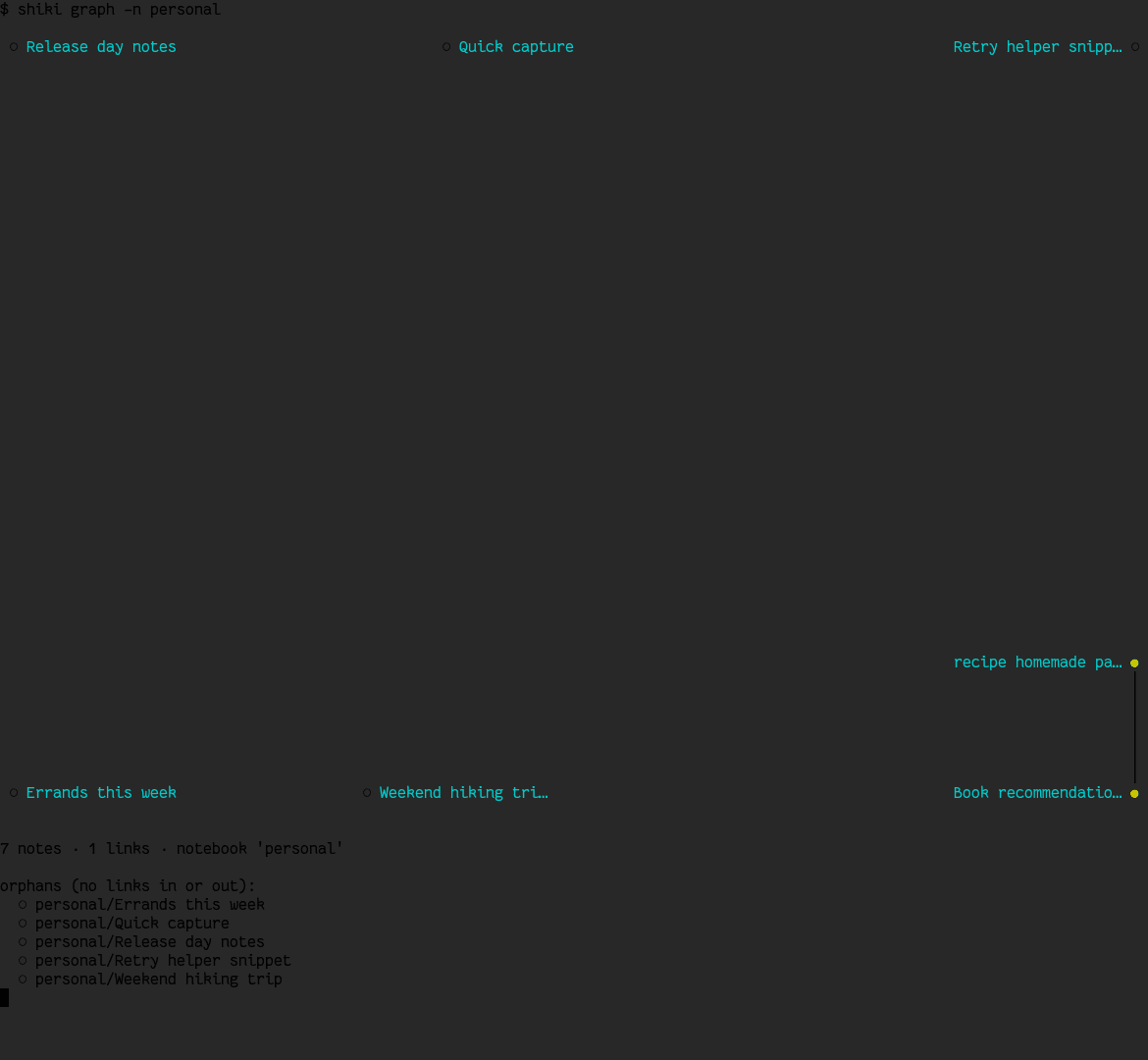
shiki graph               # [[wikilink]] connection graph, force-directed, drawn in the terminal
shiki graph -n work --json     # nodes/edges/orphans as JSON, for graphviz/d3/gephi
shiki graph --width 120        # custom canvas width in columns (default: the terminal's own width)
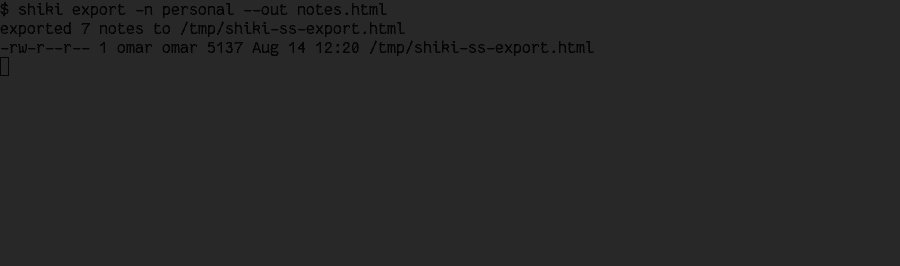
shiki export -n work --out bundle.html            # every note in "work" as one self-contained HTML file
shiki export -n work --out bundle.md --format md  # or a plain concatenated Markdown bundle
shiki publish -n work                     # render "work" to a themed PDF via pretty-pdf (auto-fetched, see below)
shiki publish -n work --out report.pdf --theme dark   # custom path/theme; theme defaults to export.pdf_theme
shiki sync                # git commit+push default notebook
shiki sync -n work        # git sync in "work"
shiki diff                # pending working-tree changes (also `shiki diff <note>` / `-n work`)
shiki log                 # recent commits (also `shiki log <note>` / `-n work`); --json/--limit/--offset/--no-limit too
shiki config              # show config path
shiki notebook create <name>
shiki notebook list --json
shiki notebook rename <old> <new>
shiki notebook delete <name> --yes  # permanently deletes the notebook and every note in it
shiki notebook encrypt <name>       # enable encryption at rest (prompts for a passphrase, twice)
shiki notebook decrypt <name>       # reverse it — decrypts every note back to plain text
shiki notebook rekey <name>         # change the passphrase (verifies the old one, re-encrypts in place)
shiki extension install             # install the browser-extension native host (also status/uninstall/pack)
shiki query 'where status = pending sort due asc'   # Dataview-style filter/sort over frontmatter
shiki query 'where due < today' --count             # for status bars, like `shiki tasks --count`
shiki query --saved due-soon                        # run a query saved under [queries] in config.toml
shiki theme list          # list built-in themes, marking the active one
shiki theme set <name>    # switch theme (persisted to config.toml)
shiki theme create [--from <name>]  # scaffold all 19 color overrides from a real palette
shiki doctor              # environment check: config, data dir, git, editor, terminal, keybindings, snippets
shiki agent status                    # which agentic tools (Claude Code, Cursor, ...) are connected
shiki agent connect cursor            # registers shiki-mcp + usage guidance with one client
shiki agent connect --all             # every supported client in one go
shiki agent connect cursor --project  # this project's own config instead of the user/global one
shiki agent connect generic           # prints a copy-pasteable MCP snippet, writes nothing
shiki agent disconnect cursor         # reverses connect — removes the MCP entry + guidance
shiki graph — hubs, edges, and orphans, drawn right in the terminal.shiki export — a whole notebook, one self-contained file.
shiki publish (leader+P in the TUI) renders a notebook to a
themed PDF through go-pretty-pdf, a separate Go binary shelled out to as an external
process — never linked into shiki itself. The first run fetches and caches it
automatically, so this never requires a manual install step. --theme picks
one of pretty-pdf's 17 built-in themes; the TUI's Settings → EXPORT tab
cycles the same set for export.pdf_theme, the config-level default
shiki publish falls back to when --theme isn't given.
Something feels wrong? Run shiki doctor first.
It checks your config file, data directory, git installation, editor, terminal color
support, and keybindings for common mistakes (two shortcuts bound to the same key,
a config path that doesn't resolve, etc.) — and it's designed to still work and explain
what's wrong even when your config.toml itself is broken, which is exactly
the situation you're in when you'd reach for a diagnostic command in the first place.
It also checks: unrecognized keys anywhere in config.toml;
general.default_notebook actually matching an existing notebook;
data_dir being a real directory, not just existing; two notebooks
resolving to the same path on disk; git.remote_template containing its
{notebook} placeholder; and git.sign_commits having an actual
signing key configured.
Built for scripts and AI agents, not just humans at a keyboard.
Every note-level operation — create, read, tag, set custom frontmatter fields, query,
update, rename, move, and delete — has a non-interactive CLI form that returns plain
text or --json and a real exit code, with no $EDITOR or TUI
required at any step. That's the same primitives the TUI itself uses
(shiki-core), so an agent-driven change behaves identically to one made by
hand. shiki rename rewrites inbound [[wikilinks]] by default
(there's no confirm dialog to ask on the command line); shiki field writes
into the same per-note frontmatter map shiki query filters and sorts on, so
a value set with --set priority=3 keeps its real type when queried back.
An encrypted notebook never blocks forever on an interactive passphrase prompt in a
non-TTY context: set SHIKI_PASSPHRASE (and SHIKI_NEW_PASSPHRASE
for notebook encrypt/rekey) and it's read straight from the
environment instead — otherwise you get a clear error, never a hang. Run
shiki doctor first in any automated environment to confirm the config and
data directory actually resolve before relying on it.
list/search/query/tasks/log
are all paginated by default (50 items) — a large notebook or a wide cross-notebook query
can't accidentally get dumped into an agent's context in one call. Page through with
--limit/--offset, or use --no-limit when everything
really is wanted; --json for these wraps the array as
{"total", "offset", "limit", "returned", "has_more", "items"} so a caller
always knows whether to keep paging. shiki index [-n <notebook>] is the
companion command — a structural overview (note counts, busiest folders, busiest tags,
never bodies or titles) meant as the very first call when orienting in an unfamiliar
shiki setup, capped to the busiest 25 folders/tags each so the index itself always stays
small too.
MCP server (shiki-mcp)
A separate binary, shiki-mcp, exposes the same operations as typed MCP (Model
Context Protocol) tools — an AI client calls them directly with structured,
schema-validated JSON arguments over stdio, instead of shelling out to shiki
and quoting/parsing text. It calls straight into shiki-core, never the
shiki binary itself. Register it with any MCP client by pointing at the built
binary — no port or daemon to manage:
28 tools, one per operation — reading (list_notes, show_note,
search_notes, query_notes, list_tasks,
index, list_notebooks, diff_notebook,
log_notebook, doctor), writing (new_note,
edit_note, delete_note, rename_note,
move_note, tag_note, set_field,
create_folder, delete_folder, move_folder,
daily_note), git (sync_notebook), and notebook management
(create_notebook, rename_notebook, delete_notebook,
encrypt_notebook, decrypt_notebook, rekey_notebook)
— each with a real parameter schema instead of CLI flags to construct by hand. Pagination
and the {total, offset, limit, returned, has_more, items} response shape match
the CLI's own exactly; delete_note/delete_folder/
delete_notebook require an explicit confirm: true argument, the
tool-call equivalent of --yes. Writes are never auto-committed
— call sync_notebook after a batch of changes to actually commit (and push, if
enabled) them, same as the CLI's own shiki sync; the server's tool
descriptions tell the calling AI this directly. Encrypted notebooks resolve their
passphrase from SHIKI_PASSPHRASE (and SHIKI_NEW_PASSPHRASE for
encrypt_notebook/rekey_notebook) in the server's own environment
— the only source available, since an MCP server has no TTY to ever fall back to a prompt
on.
Agent auto-connect (shiki agent)
shiki agent status / connect <client|--all> /
disconnect <client|--all> register shiki-mcp with a
specific agentic tool's own config and drop in usage guidance, in one command —
Claude Code, Claude Desktop, OpenCode,
Cursor, Windsurf, and Continue today,
plus connect generic for anything else (prints the plain snippet above,
writes nothing). Each client defaults to its user/global config scope — shiki notebooks
aren't bound to any one project — except Continue, which is project-only by its own
convention; --project switches to the current directory's config where a
client supports it.
Usage guidance travels with the connection: Claude Code gets a real Skill
(~/.claude/skills/shiki/SKILL.md), every other client gets a marked,
idempotent section appended to the current directory's AGENTS.md — the one
convention they all already read. Every config merge only ever touches the one JSON key it
owns (mcpServers.shiki, or mcp.shiki for OpenCode); if an
existing file doesn't parse as clean JSON, nothing is touched at all — the exact snippet to
paste by hand is printed instead. disconnect reverses both halves.
Quick capture (shiki capture + optional daemon)
The idea
Opening the full TUI just to jot down one line is friction — navigate to a notebook, press
a, type a title, type the body, save. shiki capture "some text"
skips all of it: no $EDITOR spawned, no TUI drawn, just a single line of
output. It's designed to be wired into things outside shiki entirely — a rofi/wofi
prompt bound to an OS hotkey, a waybar/polybar click action, a Raycast/Alfred script
command, an AutoHotkey shortcut on Windows, a browser extension, a cron job, another
program's own generated output piped in. Shiki can't register a global OS hotkey itself
from a terminal app, and deliberately doesn't try to — shiki capture is the
one command every one of those launchers just needs to call; see
Wiring it into external launchers below for copy-pasteable
examples of exactly that.
The design is layered on purpose: the plain command always works standalone (writes
straight to disk, works from a cold shell with no shiki process anywhere), and an
entirely optional daemon on top makes an already-running TUI aware of a capture
the instant it happens instead of finding out on the next manual reload. Nothing about
capture requires the daemon — it's an enhancement, never a dependency.
What it does by default
With no flags, it targets general.default_notebook (auto-created if it
doesn't exist yet, same as shiki new), with an auto-generated title
(Capture 2026-08-10 15:35 — a timestamp, never a prompt) so there's nothing to
type but the note's actual content.
shiki capture "buy milk"          # -> personal/capture-2026-08-10-15-35.md
shiki capture "call Ana" -n work  # -> work/capture-....md instead
echo "piped idea" | shiki capture # no argument at all -> reads the text from stdin
Every parameter, in detail
Flag
What it does
<text>(positional)
The text to capture. Omit it entirely to read from stdin instead (echo "idea" | shiki capture) — useful for piping another program's own output straight in rather than typing a literal string. Not read at all when --check or --undo is given.
-n, --notebook <name>
Overrides both general.default_notebookand content-prefix routing (below) — an explicit target always wins outright, no exceptions. Auto-creates the notebook if it doesn't exist yet, same as shiki new.
--tags a,b,c
Comma-separated tags set on the created note's frontmatter — identical format to shiki new --tags. Ignored when --daily is also given: an appended bullet has no frontmatter of its own to carry tags on.
--daily
Changes the target entirely — instead of a new note, the text is appended as a - bullet under today's daily note, via the same machinery the t keybinding/shiki daily already use (template + agenda section included only on first creation; an already-existing daily is just opened and appended to). For treating the daily note as a running inbox for the whole day instead of one note per capture.
--folder work/meetings
Creates the note inside that subfolder of the notebook instead of its root — any depth (work/meetings/q3 works too). Each path segment is validated the same way a single notebook/folder name is (no .., no empty segments, no embedded separators) — a typo'd --folder ../../etc fails loudly rather than writing somewhere unintended. Ignored when --daily is given, since a daily note's filesystem path is always fixed.
--json
Emits a single machine-readable line instead of a sentence — {"path": "...", "daemon": true|false, "daily": true|false} on success. For a script or browser extension that wants to act on the exact result without string-matching "captured (daemon): ".
--check
Reports whether a capture daemon is reachable right now and exits immediately — doesn't capture anything, doesn't touch stdin at all. Exits 0 if any daemon answered (reachable at all means a TUI process exists, regardless of whether it said enabled or disabled) and non-zero otherwise, so shiki capture --check && ... composes naturally in a script. --json emits {"reachable": true|false, "enabled": true|false}. Conflicts with --undo.
--undo
Reverses the single most recent capture, whichever kind it was — see Undo below for the full behavior. Doesn't touch <text>/stdin/--tags/--daily/--folder at all.
Content-prefix routing
If no -n was given and the text itself looks like
"<notebook>: <rest>" where <notebook>
case-insensitively matches a real, existing notebook, that notebook is used
automatically and the prefix is stripped from the saved text —
shiki capture "work: call Ana" needs no -n work at all. An
explicit -n always wins outright and skips this check entirely, so a
genuine note that happens to start with "word: " is never mis-routed as
long as a target was actually given. The exact same check runs whether the capture ends
up going through the daemon or the standalone fallback, so routing behaves identically
either way.
How the capture daemon works
general.enable_capture_daemon (on by default — toggle it from
leader+s → GENERAL → enable_capture_daemon) makes a
running TUI listen for captures instead of only finding out about them on its next
manual reload. When it's on, the TUI binds a local TCP socket on 127.0.0.1
with an OS-assigned ephemeral port (not a fixed one, and not a Unix domain socket — a plain
TCP loopback socket is the one transport that works identically on Linux, macOS, and
Windows with zero extra dependencies, and shiki genuinely ships Windows binaries, so this
wasn't a hypothetical concern). Whichever port it bound is written to
~/.config/shiki/capture.port, rewritten every time the daemon starts — so a
crashed shiki process never leaves a stale port number behind for the next
shiki capture to hang against; connecting to a genuinely dead port fails
instantly instead of timing out.
Every shiki capture invocation tries that socket first. If a TUI answers, the
new note appears live in NOTES (when you're already looking at that notebook's root) with
no keypress needed, and the capture is recorded in the TUI's own log history
(leader then l) — so a capture that happened while nobody was
watching the screen still leaves a trace, the same way a background git sync result does.
If nothing answers (no daemon running, or it answered "disabled"), the command falls
straight through to writing the file directly to disk — the exact same underlying
note-creation code path shiki new uses, so the two are never out of sync with
each other. The command's own output always tells you which path it actually took:
$ shiki capture "buy milk"
captured (daemon): /home/you/notes/personal/capture-2026-08-10-15-35.md   # a running TUI picked it up live
$ shiki capture "buy milk"
captured: /home/you/notes/personal/capture-2026-08-10-15-35.md            # written straight to disk, no TUI (or daemon off) noticed
Turning the daemon off doesn't turn capture off — shiki capture
always works, with or without a TUI running; the toggle only controls whether an
already-open TUI finds out immediately. Toggling it back on later reuses the same listener
thread rather than restarting anything — the daemon, once started this session, never
actually shuts down; off just means it answers "disabled" to new connections instead of
processing them, with no rebind/reconnect step needed to turn it back on.
shiki capture --check exists specifically for the "is anything even listening"
question — a status-bar module can poll it every so often and show a different icon for
"no TUI running" vs. "TUI running, daemon toggled off" vs. "live," without ever performing
an actual capture just to find that out.
Undo
shiki capture --undo reverses the single most recent capture — a plain note is
moved to trash (restorable exactly like any other deleted note, via the same trash
mechanism d in NOTES already uses); a --daily append instead
strips exactly the bullet that was added off the end of the daily note's body, and only if
the body still ends with it verbatim — if the daily note was edited in between, undo
refuses with a clear error rather than risk removing content you actually meant to keep.
This is a one-slot undo, not a stack, same simplicity level as
leader+u (undo delete) in the TUI itself: a second --undo in a
row reports "nothing to undo" rather than reaching further back into history.
The record backing it (~/.config/shiki/last-capture.toml) is shared between
the daemon and the standalone fallback — whichever one performed the original capture
writes to the exact same file, so --undo works identically no matter which
path made it. It tries the daemon first, the same way a capture itself does (so a live TUI
refreshes immediately if the reverted item was on screen), then falls back to reversing it
directly through that shared file if nothing answers.
Encrypted notebooks need to already be unlocked in the TUI.
Capturing into (or undoing a capture in) an encrypted notebook only works through the
daemon if that notebook is already unlocked in the running TUI this session — the
background listener thread can't itself pop up a passphrase prompt, so it replies with a
clear "locked" error instead of hanging or writing plaintext, and shiki capture
reports that error rather than silently falling back to a plaintext write. Run
shiki capture from a plain terminal (no daemon involved) against an
encrypted, locked notebook and it prompts for the passphrase interactively instead, same
as shiki new.
Wiring it into external launchers
These are starting points, not the only way to do it — anything that can run a shell
command can drive shiki capture.
Linux — rofi/wofi bound to a window-manager hotkey
#!/usr/bin/env bash
# ~/.local/bin/shiki-capture-rofi.sh — bind this to a hotkey in your WM config
text=$(rofi -dmenu -p "capture")   # swap for `wofi --dmenu` on Wayland
[ -n "$text" ] && shiki capture "$text"
; Ctrl+Shift+C anywhere in Windows
^+c::
InputBox, text, shiki capture, Quick note:
if (text != "")
    RunWait, shiki.exe capture "%text%",, Hide
return
Alfred (macOS) and PowerToys Run (Windows) both support the same idea via their own
"script filter"/"custom action" mechanisms — point either one at the same one-line
shiki capture "{query}" command. A browser extension is the one integration
that needs more than a shell one-liner (extensions can't spawn arbitrary processes
directly); it would use
Native Messaging
to launch a small native host process that in turn runs shiki capture — not
something shiki ships today, but the exact same command underneath either way.
Troubleshooting
Symptom
What's going on / what to do
Always prints captured:, never captured (daemon):
No TUI has the daemon enabled right now. Run shiki capture --check to confirm — if it says "not reachable," open the TUI and toggle enable_capture_daemon on in Settings (GENERAL tab).
shiki capture --undo says "nothing to undo"
Either nothing has been captured yet this "session" (the record is a single slot, not a history — see Undo), or a previous --undo already consumed it.
shiki capture --undo says the daily note "has changed since that capture"
The daily note was edited (by hand, or by another capture) after the one you're trying to undo — undo refuses on purpose rather than risk stripping content you meant to keep. Edit the file directly if you need to remove that specific line.
Capture landed in the wrong notebook
Check for accidental content-prefix routing — if your text happens to start with "something: " and a notebook named something exists, it routes there automatically. Pass -n <notebook> explicitly to override it.
Encrypted notebook: "locked" error via the daemon
Expected — a background thread can't prompt for a passphrase. Unlock that notebook in the TUI first, or run shiki capture from a plain terminal instead (it prompts interactively there).
Encryption at rest (per notebook, passphrase-based)
Any notebook can be encrypted independently — leader+s → NOTEBOOKS → drill
into a notebook → the encrypted field, or shiki notebook encrypt
<name> from the CLI. Every note's full content (frontmatter + body) is
encrypted as one age-armored
blob using a passphrase (age::scrypt — symmetric, no keypair), so the file on
disk stays plain ASCII text (git diff/git log -p don't flip to
"binary files differ"), just unreadable without the passphrase. Note filenames stay in the
clear — the one accepted metadata leak in this version.
There is exactly one passphrase per notebook — not one per machine, not one per person.
It's the actual encryption key (well, the input age::scrypt derives the real
key from) — the same way a password-protected ZIP file or a KeePass database has one
password that opens it anywhere, on any machine. Shiki never stores or
syncs this passphrase anywhere — not in config.toml, not in the git repo, not
in any file. You are the only distribution mechanism: write it down in a password manager,
remember it, whatever — just don't lose it. There is no recovery path if you do.
Walking through it end to end — encrypting vault with passphrase
1234567 on one machine, then opening the same repo on a second one:
Machine A (has the plaintext notebook): shiki notebook encrypt vault
prompts for the passphrase twice (typo protection), writes a small canary file
(.shiki-encryption, itself encrypted with that passphrase — exists purely to
verify a passphrase attempt without risking a real note) at the notebook's root,
re-encrypts every existing note, flips [notebooks.vault] encrypt = true in
machine A's ownconfig.toml, and commits everything. Pushing sends
ciphertext notes plus the encrypted canary — nobody who can see the repo (including the
hosting provider) can read the content without the passphrase.
Machine Bgit clones or git pulls that repo.
It gets the same ciphertext files and canary — but its own config.toml
(which never travels with the git repo; it lives outside it entirely, under
~/.config/shiki/, precisely so the passphrase/flag can't leak through git)
has no idea this notebook is encrypted at all yet.
Opening vault on machine B, shiki doesn't consult that config flag to
decide whether to prompt — it sniffs the actual file content for the age armor header, so
it notices the encryption regardless of what machine B's config says, and asks:
Passphrase — unlock 'vault'.
You type the same1234567 used on machine A — not a
different one, not "machine B's own" passphrase. Shiki decrypts the canary with it; if it
matches, every note now shows up decrypted in the UI, and machine B's
config.toml also gets encrypt = true written into it (so a note
you create or edit on machine B from now on encrypts too, instead of silently falling back
to plain text because that one machine's config didn't know yet).
Typing the wrong passphrase fails the canary check with a clear error and nothing is
shown or touched — no corruption, just a re-prompt.
Practical consequences worth knowing: CLI read commands
(list/tasks/graph/show/search)
don't prompt for a passphrase at all — they're built for non-interactive/scripted use, so
against an encrypted, locked notebook they fail with a clear error instead of hanging;
new/daily (the write paths) do prompt, since silently writing
plaintext into an encrypted notebook would be a real bug. The note-history diff view can't
work on an encrypted notebook either (a diff of two ciphertext blobs is meaningless noise) —
it falls back to showing the decrypted full content instead. And changing the passphrase
is shiki notebook rekey <name> — it verifies the old passphrase against
the canary, prompts for a new one twice, and re-encrypts every note in place without ever
writing plaintext mid-operation — and every other machine needs that new passphrase from
that point on.
Filesystem layout
shiki stores two kinds of things in two different, standard locations (respecting
$XDG_CONFIG_HOME/$XDG_DATA_HOME if you have them set — most
people don't, so the defaults below are what you'll actually see): your notes
(the data directory) and shiki's own settings (the config directory).
Everything is plain files — no database, no hidden binary format. You can open, copy, or
back up any of it with a normal file manager, and nothing breaks if you do.
Data (~/.local/share/shiki/)
~/.local/share/shiki/
├── personal/              # one notebook = one directory
│   ├── .git/              # independent git repo per notebook
│   ├── 2026-07-22-daily.md
│   ├── meeting-q3-planning.md
│   ├── rust-ideas.md
│   └── projects/          # notebooks nest folders arbitrarily deep, like `nb` —
│       └── website/       # the NOTES panel browses them one level at a time
│           └── todo.md    # (l/→/enter opens a folder, h/← goes back up)
├── work/
│   ├── .git/
│   ├── sprint-review.md
│   └── architecture.md
└── projects/
    └── ...
Frontmatter is optional on read: a plain .md file with no ---
block (from nb, an existing repo, or anywhere else) still shows up as a note
— its title comes from the first # heading or the filename, its date from
the file's mtime. It only gains real frontmatter once you touch it through shiki
(rename/edit); until then it's left exactly as it was on disk.
Don't want your notes under ~/.local/share/shiki/ at all — say, you already
keep everything in an Obsidian vault? Set general.data_dir (whole vault) or a
per-notebook path (one specific folder) in config.toml — see
the config reference.
Config (~/.config/shiki/)
~/.config/shiki/
├── config.toml            # general configuration (keybindings, theme, git, editor, snippets…)
├── shiki.log              # persistent status/log history (leader+l to view, x to clear)
├── capture.port           # port the capture daemon is listening on (only while a TUI has it enabled)
├── last-capture.toml      # backs `shiki capture --undo` — removed once undone
├── trash/                 # deleted notes/folders, restorable with leader+u (see below)
│   └── <notebook>/
└── templates/             # templates
    ├── default.md
    ├── daily.md
    └── meeting.md
Deleting a note or folder (d in NOTES scope) moves it here instead of removing
it outright, so leader+u can put it right back. Same collision reasoning as
shiki.log: this lives in the config dir, not the data dir, since the data
dir's top level is the set of notebooks themselves (user-named directories), so a fixed
name placed there could collide with one.
Note format (Markdown + YAML frontmatter)
Every note is a plain .md file. The block between the two ---
lines at the top ("frontmatter") is metadata — title, date, tags — read by shiki to build
the notes list, tag index, and wikilinks. You never have to write it by hand: creating a
note through a fills it in for you, and the /frontmatter snippet
inserts a blank skeleton if you ever need one inside the editor.
---
title: My note
date: 2026-07-22
tags: [rust, tui, ideas]
notebook: personal
links: [[another-note]], [[third-link]]
template: default
---

# My note

Content in **markdown**.

- List of items
- Code: `let x = 1;`

[[wikilink]] to another note — navigable from the TUI.
[[double brackets]] anywhere in the body link to another note by title —
PREVIEW renders them, and L (PREVIEW scope) shows both the links a note makes
and every other note linking back to it. A link to a note that doesn't exist (yet) isn't
an error; it just won't resolve until you create one with that title.
Notebooks also tolerate .txt, .mdx, .qmd,
.rmd, and .markdown files alongside .md when
listing/reading notes — a notebook pointed at an existing non-shiki directory shows those
too instead of silently hiding them: an Obsidian vault commonly has
.txt/.mdx, a Quarto scientific-publishing project uses
.qmd, R Markdown (Quarto's predecessor) uses .rmd, and some
static-site generators default to the verbose .markdown spelling. The
extension match is case-insensitive (R Markdown's real convention is capital-R
.Rmd). New notes are always created as .md; renaming a non-
.md note preserves its original extension, original case included. Beyond
this built-in list, general.note_extra_extensions (Settings modal → GENERAL)
lets a notebook treat arbitrary extra extensions — source code, plain text, anything else
shaped like content with optional YAML frontmatter — as notes too, for more support than
shiki ships with by default.
Included themes
Pick one from the live, interactive switcher on the
home page — this page already matches whatever you chose
there, including every screenshot above.
Catppuccin — Mocha
Tokyo Night — Night
Gruvbox — Dark, Light, each with Hard/Soft contrast variants
Solarized — Dark
Nord
Dracula
One Dark
Monokai
League of Legends — LoL (Jinx), LoL (Teemo), LoL (Ahri)
Video games — Pokémon (Pikachu/Charizard/Gengar), Zelda, Portal,
Super Mario (+ Luigi), Overwatch, Halo, Stardew Valley
Hacker / cyberpunk — Matrix, Cyberpunk 2077, Arasaka, Synthwave,
Tron, Fallout Terminal, Blade Runner, Doom, Ghost in the Shell, Mr. Robot
Default — inherits the terminal's own colors (fallback;
bg/fg/border are "reset", accents use
the terminal's native ANSI colors) instead of imposing a fixed palette
The list is grouped by family in the picker (Classic / LoL / Games / Hacker / System
headers, with default last); the theme picker (leader+c) has a
live filter box that matches both the name and the family — with 37 themes you just type
hack/pok/lol or a name to narrow it.
Each theme defines 19 configurable color slots: bg, fg,
accent, selection, border, statusbar,
highlight, error, warning, success,
inactive, scrollbar, tab_active,
tab_inactive, panel_title, cursor, link,
tag, muted. Slots accept #rrggbb hex, the terminal's
native ANSI names (red, blue, cyan,
darkgray, …), or "reset" to inherit the terminal's own default for
that slot. selection additionally accepts "auto" — a 20%-alpha
blend of fg over bg; the default theme uses it
(querying the terminal's real fg/bg over OSC 10/11, falling back to a fixed gray when the
terminal doesn't answer) so the selected-row band always matches the system color scheme
instead of a fixed ANSI gray that can clash with it.
leader then c — browse with live preview, Enter to keep it, Esc to cancel back to whatever was active before.
config.toml — every option, explained
One file controls everything about how shiki behaves. It lives at
~/.config/shiki/config.toml, is created with sensible defaults the first time
you run shiki, and is plain TOML — a config format that
reads like a slightly stricter INI file, no braces or indentation rules to fight. You can
edit it by hand in any text editor, or from inside shiki itself: leader then
s opens Settings, where most fields are editable without ever opening the raw
file (see the Settings deep dive). Either way, a saved
change takes effect immediately — no restart.
Every field below is optional. A brand-new config.toml — or one missing a
table entirely — falls back to the default shown for that field, so you only ever need to
write down the handful of things you actually want different from the defaults.
[general] — overall behavior
Key
Default
What it does
default_notebook
"personal"
Which notebook CLI commands act on when you don't pass -n <name> (e.g. plain shiki new, shiki list)
editor
$EDITOR, then "nvim"
The external editor E opens. Any shell command works, including one with flags, e.g. "code --wait"
daily_template
"daily"
Which template (by filename, without .md) t/shiki daily uses for a new daily note
use_favorite_editor
false
When true, i opens your OS's detected default text editor (from $VISUAL/$EDITOR, or the desktop's own file-type default) instead of the built-in inline editor — same effect as pressing E, just on the more convenient key. Toggle on the fly with leader then e, no editing required
enable_capture_daemon
true
When true, the TUI listens on a local loopback port so external shiki capture "text" invocations land here live instead of only writing to disk unnoticed — shiki capture itself always works either way, this only controls whether an already-open TUI finds out immediately. Toggle from Settings → GENERAL, see Quick capture above
mouse_drag_selection
true
A plain click on a note's body in PREVIEW jumps into edit mode with the cursor on that line; click-and-drag instead selects text and copies it to the clipboard as soon as you release the mouse button — the same clipboard mechanism the logs modal's y/c uses. A click on a <details> block's <summary> row toggles that block's fold instead of entering edit mode — expanded blocks show a ▾ handle, collapsed ones a ▸ plus a hidden-line count, and the fold state is kept per note for the session
data_dir
unset (platform default)
Point the entire notebooks root somewhere else — an absolute path to an existing folder of markdown notes (an Obsidian vault, for instance) instead of ~/.local/share/shiki/. Every notebook without its own path (below) lives as a subdirectory of this
show_hints
true
Shows a small muted hint line under the input box for text prompts whose behavior isn't obvious from the title alone — currently just new-notebook, explaining that a git URL clones and a filesystem path adopts an existing directory
remember_last_session
true
Quitting saves exactly where you were — notebook, folder, selected note/folder, and which panel had focus — and the next launch restores it instead of always starting at the first notebook's root. A renamed/deleted notebook or moved note is ignored gracefully rather than erroring
show_coffee_link
true
Shows the Buy Me a Coffee segment in the footer (mouse-clickable)
skip_delete_confirm
false
When true, deleting a note/folder skips the confirm dialog and deletes immediately — still restorable via leader then u. Doesn't apply to notebook delete, which asks a real delete-vs-untrack question
show_dates
false
Shows each note's date next to its title in the NOTES list — the persisted default for the notes-scope D toggle
wikilink_autocomplete
true
Typing [[ in the inline editor opens the wikilink autocomplete menu; off falls through to a literal [[
daily_agenda
true
A new daily note gets a "## Due today" section listing pending tasks across every notebook
compact_footer
false
Hides char/word count, reading time, and note-count detail from the footer, leaving just the essentials
show_borders
true
When true, every panel/popup draws its themed border. Off removes the box-drawing border everywhere — titles still show, since a panel's title reserves its own row independent of whether a border is actually drawn
status_message_timeout_secs
2
How long a footer status message stays visible before clearing itself (the full message is always in the logs modal regardless)
drawer_width
30
Width in columns of the notebook drawer (leader then b); clamped against the frame's actual width at render time
tasks_show_done_default
false
Whether the tasks view starts showing every task, including done ones, instead of just pending
default_note_sort
"filename"
Which order the NOTES list sorts by on a fresh launch — "filename", "title", or "date"; the notes-scope o cycle still changes it for the rest of the session
log_history_limit
500
Max entries kept in the logs modal and the persisted log file
trash_retention_days
0
Days a deleted note/folder stays in the trash before being permanently purged at startup — 0 means never auto-purge
reading_wpm
200
Words-per-minute used for the footer's "N min read" estimate
page_step
10
How many rows PageUp/PageDown (and the mouse wheel) move at once, across every scrollable list/modal
preview_images
true
Renders a  image on its own line as terminal art in PREVIEW by shelling out to chafa — falls back to the icon+alt form when chafa is missing or the file can't be decoded
chafa_path
""
Absolute path to a chafa binary that isn't on $PATH; empty means look it up on $PATH
preview_image_scale
0.5
Fraction of the preview panel's width the rendered image art is drawn at ((0.0, 1.0])
attachments_dir
"attachments"
Folder (relative to the notebook root) where pasted clipboard images are saved; the inserted  link resolves from any note depth. An empty value falls back to attachments
auto_pull_on_switch
false
Switching to a notebook that has a remote configured triggers a background pull automatically (same footer spinner as manual p), once per notebook per session
note_extra_extensions
[]
Extra file extensions (no dot, e.g. "py", "org") a notebook also treats as a note alongside the built-in md/mdx/txt/qmd/rmd/markdown — matched case-insensitively. Editable as a comma-separated list from the Settings modal's GENERAL tab; takes effect immediately, no restart needed
How to: use your existing Obsidian vault (or any markdown folder)
Two ways, depending on how much of it you want shiki to see:
The whole vault — set data_dir to the vault's path.
Every top-level folder in it becomes a notebook.
Just one folder inside it — leave data_dir unset and
give that one notebook a path instead (see
per-notebook overrides below). Different notebooks can
point at completely different folders this way, mixed with normal shiki-managed ones.
Either way: no file is moved, copied, or converted. shiki just reads and writes exactly
where you pointed it.
[keybindings] and its sub-tables — rebinding shortcuts
Every key in every table you saw in Keybindings above is one
line here. Change the value, save, and the new key works immediately — the which-key
modal (?) always reflects your actual config, so it can never show a binding
that's since been changed or removed.
Key
Default
What it does
leader
"space"
The prefix for every [keybindings.global] action — press this, then the action's own key
quit
"q"
Quits the app from the main screen
[keybindings.global], [keybindings.notebooks],
[keybindings.notes], and [keybindings.preview] each hold one key
per action from their matching table above — the full list of fields is in the
complete reference at the bottom of this section, since it's
long and purely mechanical (one line per row you already saw). Matching is on the physical
key only, not Shift/Ctrl/Alt — an uppercase letter like T is written as
"T", not with a separate modifier flag.
[theme] — colors
Key
Default
What it does
name
"gruvbox-dark"
Which built-in theme to use as the base (shiki theme list shows every name)
icons
true
When false, every Nerd Font glyph (notebook/note icons, git status, the list-selection marker, …) falls back to plain text — for a terminal font that isn't Nerd-Fonts-patched
notebooks
unset
Legacy per-notebook base-theme-name map — superseded by [notebooks.<name>] theme_name below, which also covers colors and icons. Nothing writes here anymore; still read for a config saved before that field existed
[theme.overrides]
all unset
Override any of the 19 color slots (see Included themes) individually — anything left unset falls back to name's own value for that slot
Don't want to hand-type 19 hex codes to build a custom palette from scratch? Run
shiki theme create [--from <name>] — it copies every one of a real
theme's own values into [theme.overrides] as a starting point, so you're
editing "this palette, but with two colors changed" instead of starting from a blank file.
[git] — sync
Key
Default
What it does
auto_commit
true
Whether s (manual sync) commits pending changes before attempting a push
auto_push
false
Whether a sync also pushes, once it has a remote to push to
commit_prefix
"shiki: "
Text prepended to every auto-generated commit message
remote
"origin"
Which git remote name to push/pull
branch
"main"
Which branch to push/pull — pull falls back automatically to whatever the remote's actual default branch is if this one doesn't exist there, so a repo whose default is master still works with no config change
sign_commits
false
GPG-sign commits shiki makes, using your existing git signing setup
auto_sync
false
Sync automatically in the background as you work, not only when you press s/u — see auto_sync_every
auto_sync_every
5
How many note changes (created/edited/renamed/deleted/moved) trigger one automatic sync, when auto_sync is on
remote_template
"" (off)
Auto-configure a new plain-named notebook's remote using {notebook} as a placeholder, e.g. "git@git.example.com:notes/{notebook}.git" — the remote still needs to already exist on that server; this only saves you from typing R by hand every time
[editor] — native note editor UX
Every key here is off unless noted — nothing about how the note editor (Mode::Edit)
behaves changes until you opt in, e.g. from the EDITOR tab in Settings (leader
then s).
Key
Default
What it does
mouse_selection
true
Click to position the cursor, click-and-drag to select, double-click for a word, triple-click for a line — inside the editor itself (distinct from general.mouse_drag_selection, which is PREVIEW's read-only line selection)
find_replace
true
Ctrl+F opens a find/replace bar inside the editor
os_clipboard
false
Ctrl+C/Ctrl+X/Ctrl+V use the real OS clipboard instead of the internal yank register, falling back automatically to the existing OSC 52 mechanism when there's no display server to reach (e.g. a headless SSH session)
select_all_ctrl_a
false
Ctrl+A selects the whole buffer instead of moving to the start of the line
line_numbers
false
Shows a line-number gutter in the editor
multi_cursor
false
Alt+Click adds a cursor, Ctrl+D adds the next occurrence of the current word/selection — full multi-cursor editing
auto_list_continue
true
Enter on a list/checkbox/ordered-list line continues the same prefix on the next line; an empty item exits the list instead; also gates Tab/Shift+Tab nesting a list line one level deeper/shallower
format_shortcuts
true
Ctrl+B wraps the selection in **bold**, Ctrl+Alt+I in _italic_
auto_pair_brackets
true
Typing (, `, or " wraps the current selection in the matching pair (deliberately excludes [ so it doesn't interfere with [[wikilink]] autocomplete)
paste_url_as_link
true
Pasting a bare URL over a selection wraps it as [selected text](url)
paste_images
true
Ctrl+V with an image on the clipboard saves it as a PNG under [general] attachments_dir (inside the current notebook) and inserts  at the cursor. Text on the clipboard always wins over an image
snippet_expand_tab
true
Tab expands a matching snippet trigger into its body instead of inserting a literal tab
typewriter_scroll
false
Keeps the cursor's line vertically centered in the editor viewport while typing
move_line
true
Alt+↑/Alt+↓ move the current line past its neighbor
duplicate_line
true
Alt+D duplicates the current line directly below itself
block_indent_select
true
Tab/Shift+Tab with an active selection indent/outdent every line the selection spans
insert_timestamp
true
Ctrl+D inserts today's date (YYYY-MM-DD) at the cursor, anywhere in the buffer, as a single undo step — with timestamp_with_time also on, the current time is appended
timestamp_with_time
false
Makes Ctrl+D insert YYYY-MM-DD HH:MM instead of just the date
spellcheck
false
Ctrl+E spells-checks the buffer by shelling out to hunspell: misspelled words are underlined in the editor and listed in a popup with a ▸ cursor on the selected word; Enter opens a submenu to pick which suggestion to apply, and the replaced word flashes in the theme's success color. Requires a hunspell binary and dictionary (see shiki doctor)
spellcheck_lang
""
Hunspell dictionary to check against (hunspell -d, e.g. es_ES); empty uses the system default
[[wikilink]] autocomplete is always on too, not gated by [editor]:
typing [[ opens an Obsidian-style fuzzy note picker (the same fuzzy matching
as / and global search), showing each candidate's folder breadcrumb so notes
with duplicate titles in different folders stay distinguishable — picking one inserts
[[Title]]. In PREVIEW, Ctrl+click on a rendered wikilink jumps
straight to the note it resolves to.
Typing [[ opens a fuzzy note picker — same engine as / and global search.
[export] — PDF export theme
shiki publish (CLI) and leader+P (TUI) render a notebook to a
themed PDF via go-pretty-pdf — fetched and cached automatically on first use, no
manual install step.
Key
Default
What it does
pdf_theme
"default"
One of go-pretty-pdf's 17 built-in themes: default, minimal, modern, classic, corporate, dark, academic, editorial, sepia, terminal, blueprint, ivy, government, resume, legal, latex, gruvbox. Cyclable from the EXPORT tab in Settings, or overridden per-invocation with --theme
export_dir
""
Directory PDFs are saved into (default: the app's own data dir, i.e. {data_dir}/exports/{notebook}.pdf). Empty means "use the app's own data dir"; set it to point exports somewhere else instead — a synced folder, Desktop, etc
ask_export_path
false
When true, publishing always opens a prompt asking exactly where to save the PDF (prefilled with the resolved default path) instead of silently writing to export_dir/the default location every time
[export]
pdf_theme = "default"
# export_dir = ""       # save PDFs elsewhere instead of the app's data dir
# ask_export_path = true  # prompt for the save path on every publish
[notebooks.<name>] — per-notebook overrides
Every field above in [git] is a global default. Any individual
notebook can override just the ones it needs — a scratch notebook with no remote stays
untouched while a real work notebook auto-syncs every couple of edits, without one global
setting forcing the same policy onto both.
Key
Default
What it does
auto_push
inherits [git]
Override just for this notebook
auto_sync
inherits [git]
Override just for this notebook
auto_sync_every
inherits [git]
Override just for this notebook
path
unset (lives under the data directory)
An absolute path to an existing directory on disk — this notebook lives there instead of under data_dir/the default data directory. Must be absolute; a relative value is ignored (shiki doctor warns if one is found) rather than silently resolved against whatever directory the process happened to be launched from
hidden
unset (false)
Set when "delete notebook" was answered with "just remove the reference" instead of "delete the files" — the directory on disk is left untouched, this only stops the notebook from being listed/tracked. Reversible in-app: Settings → NOTEBOOKS lists hidden notebooks (marked (hidden)) and drilling into one lets you clear the flag to restore it
encrypt
false
Encrypts every note in this notebook at rest with a passphrase — no global default to inherit, opt-in per notebook. Managed via shiki notebook encrypt/decrypt/rekey <name> or Settings → NOTEBOOKS, not by hand-editing this value (the passphrase itself is never stored here or anywhere else — see Encryption above)
theme_name
inherits [theme] name
This notebook's own base theme — wins the moment it's focused, no restart. Set via the theme picker (leader then c, while this notebook is selected) or shiki theme set <theme> --notebook <name>
theme_icons
inherits [theme] icons
This notebook's own icons override — a 3-state cycle (unset/on/off) from Settings → NOTEBOOKS → (notebook) → icons
any of the 19 color slots
inherits [theme.overrides]/the base theme
Same 19 slots as [theme.overrides] (see above), scoped to just this notebook — layered on top of the global override, which is layered on top of the resolved base theme. Scaffold all 19 at once with shiki theme create --from <theme> --notebook <name>
Settings → NOTEBOOKS → (notebook) also has an "apply to all" action (A) that
clones this notebook's fully-resolved theme — base name, all 19 colors, and icons, whether
inherited or already customized — onto every other notebook in one shot. Handy for
"maximum customization" in reverse: pick and tweak one notebook's look, then broadcast it
everywhere instead of repeating the setup per notebook.
leader then b — every notebook's sync status at a glance, color-coded.
[snippets.<trigger>] — custom /-menu commands
Empty by default — the 21 built-in commands (h1/h2/h3/
bold/italic/code/math/table/check/quote/
divider/date/tags/frontmatter/bullet/
numbered/link/image/note/warning/
details) aren't listed in your config at all unless you're overriding one; only
your own additions show up here.
Key
Default
What it does
label
the trigger itself
The text shown in the /-menu list
body
(required)
What gets inserted. Supports {{title}}/{{date}}/{{time}}/{{notebook}} (same substitution as note templates) and a {{cursor}} marker for where the cursor should land after insertion
[snippets.callout]
label = "Info callout"
body = "> **Info:** {{cursor}}"

# Same trigger as a built-in (case-insensitive) replaces it instead of
# adding a duplicate — every command in the menu is customizable this way.
[snippets.h1]
body = "# [{{title}}] {{cursor}}"
Settings' SNIPPETS tab (leader then s) can create, edit, and
delete these without ever opening the raw file — see below.
[queries] — saved query DSL strings
Named, saved shiki query DSL strings (the same Dataview-style language the
leader+q modal accepts), keyed by name. Run one with
shiki query --saved <name> — handy for status bars, since
--count/--json work the same as with a literal query. Empty by
default.
Key
Default
What it does
<name>
(none — no saved queries)
A query DSL string (e.g. where due < today sort due asc), looked up by name with shiki query --saved <name>
[queries]
due-soon = "where due < today sort due asc"
# ...run it with: shiki query --saved due-soon
The Settings screen — editing all of the above without touching the file
leader then s — every option above, editable in place.
←/→ switches between seven tabs — GENERAL, THEME, GIT, EDITOR,
EXPORT, NOTEBOOKS, SNIPPETS — mirroring the sections above one for one. EXPORT holds
pdf_theme (cycling through pretty-pdf's 17 built-in themes — the
default shiki publish/leader+P fall back to),
export_dir (a text prompt showing where PDFs land, resolved against the app's
data dir when empty), and ask_export_path (a plain in-place toggle). j/k moves
within a tab, Enter edits or toggles the highlighted row (a true/false field
flips immediately and saves; anything else opens a one-line prompt prefilled with its
current value), and Esc/q closes. NOTEBOOKS and SNIPPETS are two
levels deep — Enter drills into a specific notebook or snippet,
h/Esc/Backspace backs out one level. A change here
is saved to the real config.toml immediately; an invalid edit is reported and
rejected without touching the file, so the app you're currently running never breaks
itself out from under you.
Full raw reference
Everything above, as one complete, valid config.toml — copy whichever parts
you want, or generate this exact structure (fully commented) yourself by running shiki
once with no existing config file.
[general]
default_notebook = "personal"
editor = "nvim"
daily_template = "daily"
# When true, `i` opens the OS's detected favorite editor (env $VISUAL/$EDITOR,
# then the desktop's default text/plain handler) instead of the inline editor.
use_favorite_editor = false
# When true, the TUI listens on a local loopback port so external
# `shiki capture "text"` invocations land here live instead of only
# writing to disk unnoticed. `shiki capture` itself always works either
# way — this only controls whether an already-open TUI finds out
# immediately. On by default; toggle from leader+s -> GENERAL.
enable_capture_daemon = true
# When true, click-and-drag over a note's body in PREVIEW selects text and
# copies it to the clipboard (OSC 52, same mechanism as the logs modal's
# `y`/`c`) as soon as the mouse button is released.
mouse_drag_selection = true
# Optional override for the notebooks root directory. Set this to an
# absolute path to an existing folder of markdown notes (e.g. an Obsidian
# vault) to use it as the notebooks root instead of the platform default
# (~/.local/share/shiki/). Notebooks are subdirectories of this path.
# data_dir = "/Users/me/my-obsidian-vault"
# When true, text-input prompts that have one (e.g. new notebook) show a
# small hint line explaining non-obvious input, like pasting a git URL.
show_hints = true
# When true, quitting the TUI remembers exactly where you were — notebook,
# folder, selected note/folder, and focused panel — and the next launch
# restores it instead of always starting at the first notebook's root.
remember_last_session = true
# Shows the "Buy Me a Coffee" segment in the footer (mouse-clickable).
show_coffee_link = true
# When true, deleting a note/folder skips the confirm dialog and deletes
# immediately — still restorable via leader+`u`. Doesn't apply to notebook
# delete, which asks a real delete-vs-untrack question.
skip_delete_confirm = false
# Shows each note's date next to its title in the NOTES list.
show_dates = false
# Typing `[[` in the inline editor opens the wikilink autocomplete menu.
wikilink_autocomplete = true
# A new daily note gets a "## Due today" section listing pending tasks
# across every notebook.
daily_agenda = true
# Hides char/word count, reading time, and note-count detail from the
# footer, leaving just the essentials.
compact_footer = false
# When true (default), every panel/popup draws its themed border. Off
# removes the box-drawing border everywhere (titles still show).
show_borders = true
# How long a footer status message stays visible before clearing itself.
status_message_timeout_secs = 2
# Width in columns of the notebook drawer (leader+`b`). Clamped against
# the frame's actual width at render time regardless of this value.
drawer_width = 30
# Whether the tasks view (leader+`t`) starts showing every task, including
# already-done ones, instead of just pending.
tasks_show_done_default = false
# "filename", "title", or "date" — which order the NOTES list sorts by on
# a fresh launch.
default_note_sort = "filename"
# Max entries kept in the logs modal (leader+`l`) and the persisted log
# file.
log_history_limit = 500
# Days a deleted note/folder stays in the trash before being permanently
# purged at startup. 0 (the default) means never auto-purge.
trash_retention_days = 0
# Words-per-minute used for the footer's "N min read" estimate.
reading_wpm = 200
# How many rows PageUp/PageDown (and the mouse wheel) move at once, across
# every scrollable list/modal in the TUI.
page_step = 10
# When true (default), a `` image on its own line renders as
# terminal art in PREVIEW via `chafa` (external binary). Off falls back to
# the icon+alt form.
preview_images = true
# Absolute path to a `chafa` binary that isn't on $PATH (empty = look it up).
chafa_path = ""
# Fraction of the preview panel's width the art is drawn at (0.0, 1.0].
preview_image_scale = 0.5
[keybindings]
leader = "space"
quit = "q"
[keybindings.global]
theme_picker = "c"
global_search = "g"
tags_panel = "T"
logs = "l"
toggle_favorite_editor = "e"
check_update = "U"
drawer = "b"
undo_delete = "u"
settings = "s"
scratchpad = "p"
# Same links modal as [keybindings.preview]'s own binding, from any panel.
links = "B"
# Global tasks view — every checkbox task in every notebook.
tasks_panel = "t"
# Dataview-style query modal over frontmatter — same engine as `shiki query`.
query_panel = "q"
publish = "P"
# Same HTML/Markdown bundling as `shiki export`.
export = "x"
# Full-screen single-panel layout, hiding NOTEBOOKS/NOTES — a true toggle.
zen_mode = "z"
[keybindings.notebooks]
new = "a"
rename = "r"
delete = "d"
sync = "s"
pull = "p"
pull_all = "P"
set_remote = "R"
push = "u"
[keybindings.notes]
new = "a"
new_folder = "f"
rename = "r"
delete = "d"
edit_inline = "i"
edit_external = "E"
search = "/"
daily_note = "t"
move_to_notebook = "m"
sort = "o"
tree_view = "T"
toggle_dates = "D"
visual = "v"
copy_entries = "y"
# Metadata editor — tags plus custom frontmatter fields, add/edit/delete.
metadata = "M"
[keybindings.preview]
edit_inline = "i"
edit_external = "E"
history = "H"
links = "L"
outline = "o"
# Same metadata editor as NOTES scope, bound here too.
metadata = "M"
[theme]
name = "gruvbox-dark"
icons = true # false falls back to plain text — no Nerd Font glyphs anywhere
# Every one of a theme's 19 color slots can be overridden individually —
# accent, bg, fg, selection, border, statusbar, highlight, error, warning,
# success, inactive, scrollbar, tab_active, tab_inactive, panel_title,
# cursor, link, tag, muted. Override as many or as few as you want; anything
# left unset falls back to `name`'s own value for that slot. A couple of
# examples:
# accent = "blue"
# bg = "#1e1e2e"
# fg = "#cdd6f4"
#
# `shiki theme create [--from ]` scaffolds *all 19* here at once,
# copied from a real palette (defaulting to whichever theme is active) —
# a starting point to edit slot-by-slot instead of hand-typing hex codes
# from scratch with no example to copy from.
[git]
auto_commit = true
auto_push = false
commit_prefix = "shiki: "
remote = "origin"
branch = "main"
sign_commits = false
auto_sync = false
auto_sync_every = 5
# Auto-configures a notebook's remote on creation (plain name, not a pasted
# URL) — "{notebook}" is replaced with the new notebook's name. The remote
# still has to already exist on that server; this doesn't create one via
# any hosting provider's API. Empty (the default) means don't auto-configure
# anything.
remote_template = ""
# remote_template = "git@git.example.com:notes/{notebook}.git"
# Native note editor (Mode::Edit) UX — every key is independently toggleable
# from the EDITOR tab in Settings; the mostly-additive conveniences default
# to true, the ones that change existing behavior (clipboard wiring, line-
# number gutter, multi-cursor, Ctrl+A select-all, typewriter scrolling)
# default to false.
[editor]
mouse_selection = true
find_replace = true
os_clipboard = false
select_all_ctrl_a = false
line_numbers = false
multi_cursor = false
auto_list_continue = true
format_shortcuts = true
auto_pair_brackets = true
paste_url_as_link = true
snippet_expand_tab = true
typewriter_scroll = false
move_line = true
duplicate_line = true
block_indent_select = true
# PDF export (`shiki publish`, leader+`P`) — pdf_theme picks one of
# go-pretty-pdf's 17 built-in themes: default, minimal, modern, classic,
# corporate, dark, academic, editorial, sepia, terminal, blueprint, ivy,
# government, resume, legal, latex, gruvbox. Cyclable from the EXPORT tab
# in Settings.
[export]
pdf_theme = "default"
# export_dir = "" # save PDFs elsewhere instead of the app's data dir
# ask_export_path = true # prompt for the save path on every publish
# Optional per-notebook overrides of [git] — anything left unset here falls
# back to the global values above.
#
# Each notebook can also have an independent `path`, pointing it at any
# existing directory on disk instead of the default location under the
# data directory. Useful for linking Obsidian vault subfolders or other
# existing markdown collections as notebooks without moving files.
[notebooks.alcateia]
path = "/Users/me/obsidian-vaults/alcateia"
# Standard git overrides work alongside path:
auto_sync = true
[notebooks.work]
auto_sync = true
auto_sync_every = 3
auto_push = true
# encrypt = true
# hidden = true # set by "just remove the reference" on delete; un-hide from Settings → NOTEBOOKS
# Full per-notebook theme customization: base name, any of the 19 color
# slots, and its own icons toggle — independent of the global [theme] and
# of every other notebook. Settings → NOTEBOOKS → work → "apply to all"
# clones this onto every other notebook in one shot.
theme_name = "nord"
theme_icons = true
# accent = "#88c0d0"
# Custom entries for the inline editor's `/`-menu, keyed by trigger. Empty by
# default — the built-in commands (h1/h2/h3/bold/italic/code/math/table/check/
# quote/divider/date/tags/frontmatter/bullet/numbered/link/image/note/warning/
# details) aren't listed here at all, only your own additions/overrides.
# `label` falls back to the trigger when omitted; `body` supports
# {{title}}/{{date}}/{{time}}/{{notebook}} (substituted the same way note
# templates are) plus a {{cursor}} marker for where the cursor lands after
# insertion.
[snippets.callout]
label = "Info callout"
body = "> **Info:** {{cursor}}"
# Same trigger as a built-in (case-insensitive) replaces it instead of
# adding a duplicate — every command in the menu is customizable this way.
[snippets.h1]
body = "# [{{title}}] {{cursor}}"
# Named, saved `shiki query` DSL strings — run one with `shiki query --saved `.
[queries]
# due-soon = "where due < today sort due asc"
Every default shown above matches the current release — if this page and a fresh
shiki install ever disagree, trust the install.
Best practices & ideas
None of this is required — shiki works fine note-by-note with zero configuration. These
are just patterns that tend to work well once you have more than a handful of notes.
One notebook per "area of life," not per project. "personal" and
"work" scale better than a notebook per project, since tags and folders
already give you finer organization inside a notebook — a new git repo per project is
usually more overhead than it's worth.
Let auto_sync do the git work. Turning it on with a
reasonable auto_sync_every (3–5) means you basically never think about
committing — just write, and it catches up in the background.
Use daily notes as a landing pad, not a filing system. Capture things
in today's note (t) as they happen; when something turns out to matter,
give it its own note and [[link]] back to the day you first wrote it.
Tags for "what kind," folders for "where it belongs." A tag like
#recipe cuts across folders (global search and the tags panel find it
anywhere); a folder like projects/website/ is about location, browsable
from the tree view.
Snippets are for structure you'd otherwise retype. If you catch
yourself typing the same callout/checklist shape more than twice, that's the signal to
turn it into a [snippets.<trigger>] entry instead.
Treat git history as permanent when writing notes with sensitive info.
A revert (r in the history modal) restores old content — it doesn't erase
the fact that content once existed. Don't put anything in a synced, pushed notebook you
wouldn't want in a permanent record.
shiki doctor before opening an issue. It catches the most
common self-inflicted config mistakes (colliding keybindings, a malformed key string, a
non-absolute notebook path) directly, often faster than describing the
symptom.