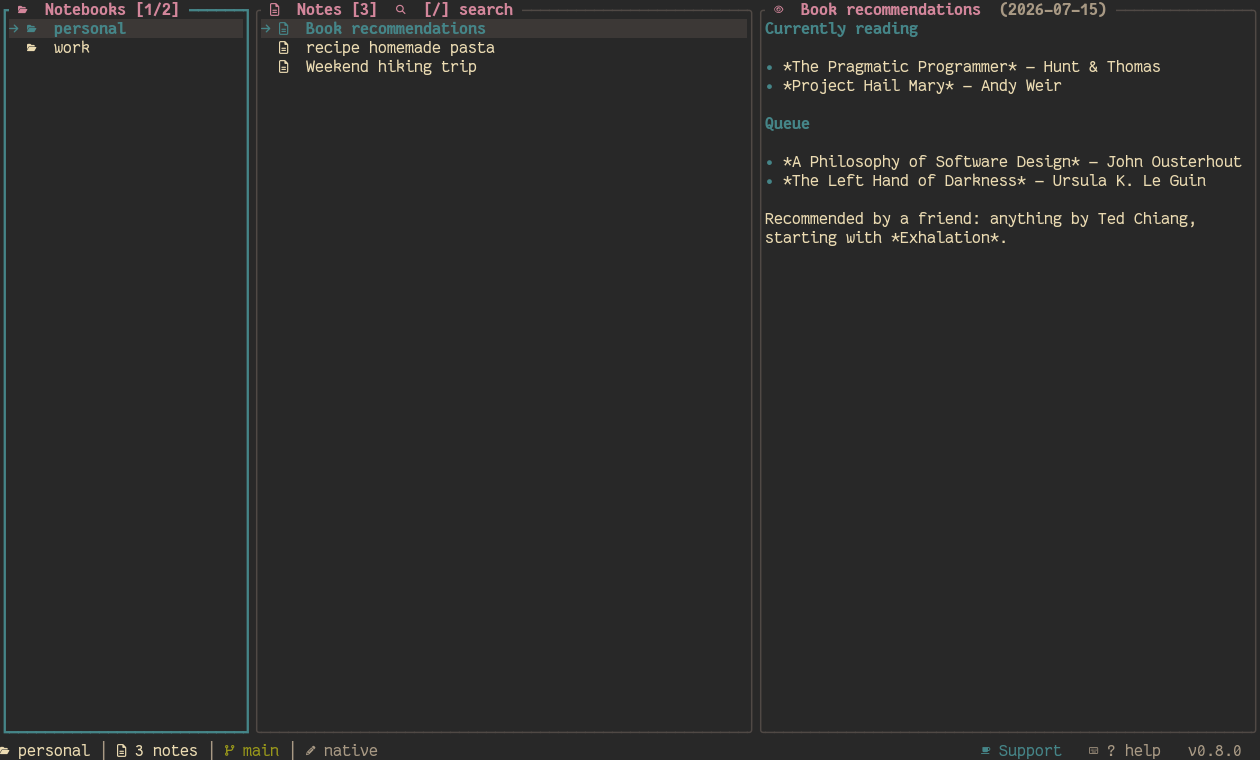
Added
- Note version history (PREVIEW-scope
H): every commit that changed the specific note being read, newest first — real git history, not a separate versioning system. Enter views a revision's full content, r reverts to it (behind a confirmation). A revert doesn't commit by itself; it becomes a normal pending change picked up by s/u/auto_sync like any other edit. The footer shows the count while reading a note ({n} changes).
D (notes-scope) toggles each note's date next to its title in the NOTES list, off by default.- The 3-panel layout is now responsive to terminal size instead of one fixed arrangement: wide terminals keep the original side-by-side columns; narrow-but-tall or square terminals stack the same panels vertically instead (still full-width, just not side-by-side); very small terminals show only the focused panel, full screen, with no collapsed siblings. Navigation (
hjkl/tab) works identically at every size. Verified by resizing an actual terminal from 200×50 down to 20×8 with no crash or broken rendering at any point.
- Footer now shows which editor mode is active — the resolved favorite editor's name (e.g.
nvim) when general.use_favorite_editor is on, native (the built-in inline editor) when it's off — plus a new leader+e shortcut to toggle it on/off and persist the change immediately, instead of hand-editing config.toml.
shiki doctor: an environment health check (config validity, data/templates dirs, git/gh on $PATH, terminal truecolor support, configured editor, notebook/remote summary). Works even when config.toml is malformed — unlike every other command, it diagnoses that instead of failing outright.README.md and LICENSE (MIT) — install (cargo install --path shiki-cli), update, and verify (shiki --version, shiki doctor) instructions for installing from a clone, since this isn't published to crates.io yet. Every crate's Cargo.toml now also carries repository (previously only set at the workspace level but never actually inherited by any crate), keywords, categories, and a readme pointing at it.auto_sync: a notebook can sync itself (commit, + push if auto_push) automatically every auto_sync_every note changes, instead of only on manual s. Push failures (no internet, auth, etc.) never block — the commit already happened locally, and the next attempt just retries.u: commits and always pushes, regardless of auto_push/auto_sync — the explicit "sync right now" override.- Which-key (
?) is now a near-full-screen searchable list instead of a small centered popup: type to filter by key/action/scope, ↑/↓/PageUp/PageDown/Home/End to move the selection, Enter runs the highlighted action immediately — doubles as a fast command palette.
Changed
- Selecting a folder (not a note) in NOTES now previews what's actually inside it in PREVIEW (subfolders, then notes, or "Empty folder.") instead of a static "press enter to open this folder" hint — same spirit as selecting a note already showing its content.
- Collapsed (out-of-focus) panels are now 1 column wide instead of 3 — just the border line, since that's already enough to show there's a collapsed panel there.
- Status bar footer redesigned: no background fill, no "NORMAL" mode label (only INSERT/EDIT/ VISUAL are shown), no theme name. Shows contextual metadata instead (character count of the note being read, or note count while browsing notebooks), the current git branch with a dirty/needs- pull indicator, and groups
? help with the version on the right.
- Notebook sync is smarter and per-notebook: commit messages are now auto-built from the diff (e.g. "shiki: 2 updated, 1 added") instead of a fixed generic message, so nothing needs to be typed by hand.
auto_push/auto_sync/auto_sync_every can be overridden per notebook under [notebooks.<name>], falling back to the global [git] defaults.
- Footer git status now shows actual counts instead of a bare marker:
+N uncommitted files, ↑N commits not yet pushed, ↓N commits not yet pulled in — all three at once if applicable (e.g. a diverged branch), instead of just one dirty/clean indicator.
- The note-preview title no longer shows a
[j/k scroll] hint (redundant once scrolling — and now PageUp/PageDown/Home/End — is the obvious way to move around); shows the note's date in a muted tone instead.
Fixed
- Every theme's
selection color was defined but never actually rendered anywhere — every list (notebooks, notes, tree, logs, global search, theme picker, which-key) only bold-colored the selected row's text, with no highlighted background band, making every theme look flatter/less faithful than it should. Selection now gets a real background highlight in each theme's own selection color.
- Notebook-level git shortcuts (
s sync, u push, p/P pull, R set remote) previously only worked while the NOTEBOOKS panel had focus — pressing u while reading a note in PREVIEW did nothing at all, with no error or explanation. They now work from any panel, since they act on the selected notebook, not the focused panel.
push failed with "src refspec 'refs/heads/main' does not match any existing object" on any notebook whose real branch isn't the globally configured one (e.g. master, via pull's branch-fallback) — it now pushes whatever branch HEAD actually points at instead of a fixed configured name.push reported success even when a rejection only surfaced through the remote's per-ref status (e.g. a rejecting server-side hook) rather than as an outright transport error — now verified via push_update_reference and turned into a real, reported error.u used to push only, without committing first — repeatedly pressing it on a notebook with uncommitted notes reported "pushed" every time while the dirty count never moved, since nothing had actually been committed. u now commits (same as s) and always pushes; every step (commit outcome, then push outcome including confirmation) is reported explicitly instead of a terse "pushed".PageUp/PageDown/Home/End didn't work anywhere in the app — not while reading a note in PREVIEW, and not in the which-key popup, logs, global search, or tree view. They now work everywhere: a bigger jump (10 at a time) or first/last, using the same list or scroll each modal already navigates with j/k.- Which-key (
?) had no scrolling at all — content that didn't fit the small centered popup was silently clipped with no way to see the rest, and any keypress just closed it (so it couldn't be typed into either).